Mardi Gras SF 2018 [Encore Publication]: A case study on shooting action in low light

San Francisco has been celebrating Carnaval for 40 years, and for the past 5 years I’ve been documenting this wonderful event.  The anniversary season officially kicked off last night with San Francisco’s take on Mardi Gras.  I covered the small parade through SF’s historic Mission District and also the performances of several comparsas (like krewes or samba schools) at one of the event’s venues.  Today’s post showcases some of my favorite images from this year’s Mardi Gras while also serving as a case study for shooting fast action in extremely low light conditions.

Taking the approach of “if you can’t beat them, join them,” remember that when shooting action in low light it is okay occasionally to intentionally allow some motion blur to emphasize the movement.  Here I achieved a soft painterly effect by choosing a slower shutter speed to capture this image of a young dancer mustering for the parade.

The use of flash is required for much low-light action photography, but that doesn’t mean your images have to be harsh or unnatural looking.  A few hints: 1) Get the flash off your camera using a flash cord or remote control; 2) Use balanced fill flash instead of automatic flash for a more realistic look; 3) Dial down the flash’s power by using flash exposure compensation (I use -1 stop most of the time); 4) These settings often will require that you use a high ISO setting and a fast lens.

Use a fast prime lens to achieve a fast shutter speed along with a relatively shallow aperture to freeze and isolate your subject.  Most of these images were made with a 50mm f/1.4 lens.

In post-processing your images, consider these tips: 1) Apply some noise reduction to mitigate the digital noise associated with high-ISO shooting; 2) Adjust the white balance to render the colors you remember from the shoot (always shoot in RAW mode if possible to allow setting the white balance during post-processing); 3) Apply a touch of post-crop vignetting to emphasize your subject and reduce background clutter.

For group shots, try to find an uncluttered background and pose everyone as tightly as possible so that your fill flash will illuminate them evenly.  Don’t use a wide-angle lens for group shots!  Sure, doing so will make it easier to fit in all the subjects, but it also provides a very unflattering perspective for most people.  Here I shot with a 50mm “normal” lens and moved back to fit in the entire group.

Portraits work very well using balanced fill-flash techniques.  Be sure to find an uncluttered background and get the flash unit off the camera.  Here I bounced the flash off the awning of a building to achieve a soft effect relatively unencumbered by shadows.

By applying some of these techniques, you can capture fast-moving action even under extremely low-light conditions and still achieve realistic looking and flattering results.

Do you have suggestions for shooting action in low light?  Please share your thoughts here.

Want to read more posts about photographic techniques?  Find them all here: Posts about techniques.  And remember that all the images featured in this post as well as thousands more are available for viewing or purchase on my website–just click on any photo to view it in more detail.

I Feel Like a Kid in a Candy Store: Capturing the spectacular SF Movement Arts Festival

As an official photographer once again for this year’s SF Movement Arts Festival, last Friday I had the privilege and pleasure of capturing images of most of the more than 300 talented and diverse performers who participated in this year’s amazing event. If you live in the SF Bay Area and missed it, this year there will also be a summer version, presented in July.

This epic event of breathtaking beauty and scope brings together many of my favorite choreographers and dancers–those with whom I collaborate throughout the year, their younger students, and some who I’ve never met before–representing a tremendous range of movement practices and dance styles, and throws them all into the grand interior spaces of San Francisco’s iconic Grace Cathedral. My assignment, truly a labor of love, is to stay all day and all night: for the rehearsals, side photo shoots, and the performance, in an effort to capture images of nearly every performer in the festival. Truly, I feel like a kid in a candy store, having the opportunity to make images with so many amazing movement practitioners in this ethereal space, all in one day.

Today’s post, presented as a simple photo essay, shares some of my favorite images from this mind-boggling event. All I will add in the way of technical notes are a few points my regular readers will already know to expect from me:

  • When shooting fast-moving action in a relatively dark space, use as fast a lens as you can given your focal length needs, boost your camera’s ISO sensitivity setting to as high as you can get away with, and choose an aperture as wide as possible given the depth-of-field you seek
  • Choose a shutter speed that is fast enough to freeze the performers’ movement, unless you’re intending to create an artistic motion blur
  • Watch your backgrounds: what’s behind your main subject is as or more important than your subject itself, so try to choose a pleasing or less distracting background whenever possible, and keep your horizons level
  • Compose your images with an eye toward putting your viewer within the performance to experience the beauty, athleticism, and grace first-hand
  • Shoot lots of images because the performers’ body postures, gestures, and facial expressions will change in an instant and you want to be sure to capture a few frames that bring out their very best.

You can view and purchase all of the images in this post, and many more, by visiting my web gallery here: SFMAF Photo Gallery .


I hope you’ve enjoyed this small sampler of images from the incredible SF Movement Arts Festival. You can view and purchase all of these and many more by visiting my web gallery here: SFMAF Photo Gallery .

Do you have a favorite festival or cultural event that inspires and excites you so thoroughly that you feel you could photograph it every day? What are your go-to techniques for capturing images at these events? Please share your thoughts here!

Focus on Yosemite National Park [Encore Publication]: A photographer’s dream, Yosemite offers so much more than the postcard views

Those of us who live in the San Francisco Bay Area can count many blessings, but one I am most thankful for is our fairly close proximity to Yosemite National Park.  The second oldest national park in the US, Yosemite is a photographer’s dream.  Since the days when Ansel Adams helped make the park famous through his masterful landscape photography, shutterbugs of all stripes have been flocking there to try to capture some of its indescribable beauty.  Most of us will never be an Ansel Adams, but that doesn’t stop me from returning to Yosemite at least once per year to give it my best shot, as it were.

Without doubt, there are many iconic views in the park that are relatively easy for even novice photographers to render.  There is majesty in the panorama over Yosemite Valley as seen from the famous Tunnel View lookout.  One doesn’t even have to venture off the main park road to shoot a nice image of Half Dome or El Capitan.  But Yosemite offers so much more to the photographer who’s willing to look a bit more closely, to hike a little instead of jumping out of a car to shoot, or to come to a spot at unusual times, including the middle of the night.

In this post, I’ll share a few images I made in Yosemite National Park over the past year, but none of them will be a postcard-type shot that you’ve seen 1000 times before.  And we’ll talk a bit about how to find and capture these less discovered views.

While hiking in the Tuolumne Meadows area, 5000 feet above Yosemite Valley, we were caught in a freak hailstorm at the remote Dog Lake.  Instead of throwing a rain cover over my gear and running for shelter like a normal person would do, I set up my kit and started shooting.  This image plays off the contrasts between the peaceful and violent sides of nature and between the light and the shade.  It is a composite of several different shots made at different exposures, put together in Lightroom’s HDR (high dynamic range) merging tool.

Yosemite offers unusual and dramatic views to those willing to get away from the roads and brave some harsher conditions.  Buy this photo

Another less-visited attraction in the park is the wonderful Chilnualna Falls.  The lower waterfall is actually quite an easy hike from the parking area at the trailhead, and its little swimming hole makes for a refreshing break on a hot summer’s day.  Here’s a shot of my younger daughter enjoying a dip in the swimming hole just under the falls.  To blur the water, I used a slow shutter speed, which could only be achieved in the harsh mid-day light by attaching neutral-density filters to the lens.  Neutral-density (ND) filters are an essential accessory for the landscape photographer, because they block most of the available light from reaching the camera’s sensor, allowing you to use a slower shutter speed to blur motion and/or a wider aperture to throw the background out of focus.

These reduce the amount of light that reaches the camera’s sensor, so you can use slower shutter speeds to blur motion, or so you can use a wider aperture to get a shallow depth-of-field, even in bright sunlight.

A neutral-density filter allows a nicely blurred shot of the waterfall at Chilnualna Falls.  Buy this photo

Another lovely hike in the high country of Tuolumne Meadows is Cathedral Lakes.  On our way back from these pristine and remote lakes, we passed this granite rock dome.  I used a polarizing filter on a wide-angle lens to bring out the details on the surface of the rock and to lend more drama to the sky.  Then, in post-processing, I converted the image to black-and-white to emphasize the remarkable texture of the granite slab’s surface.  For more discussion about converting images to black-and-white, take a look at my earlier post: B&W Photography post.

Using a polarizing filter can darken and add drama to skies, reduce unwanted reflections, and render stunning detail on shiny surfaces.  Converting an image to black-and-white can bring out the textures and patterns that may be less prominent when viewed in a color image.  Buy this photo

Just because a place is glorious in its own right doesn’t mean we can’t include people in our photos.  Putting humans in a landscape adds a personal touch, provides a sense of scale, and often tells a more compelling story than would an image of the same place without people.  Here I’ve included my daughters in a landscape from the incomparable summit of Sentinel Dome.

Including people in landscapes layers a human narrative on top of the natural story.  I like the added color, and humor, from the addition of my daughters in their college logo hats.  I’ve chosen a wide aperture to soften the focus on the lovely background.  Buy this photo

You don’t have to stop shooting when the sun sets.  Some of the most wonderful images of Yosemite are made after dark.  I came to this spot not far from the edge of the meadow in Yosemite Valley, and right on the bank of the Merced River, quite late at night when the sky was very dark.  I set up my camera and wide-angle lens on a tripod and made a 25-second exposure at a high sensitivity (ISO) setting.  The resulting image shows the spectacle of the Milky Way arched above the terrestrial grandeur of Half Dome and other Yosemite landforms.  For more discussion of capturing the Milky Way, visit this post: Milky Way photography post.

A favorite image of mine: The Milky Way above Half Dome.  Note that not every landscape image needs to be in “landscape orientation”.  Buy this photo

Next time you are fortunate enough to visit Yosemite National Park, try to discover some new places, visit favorite places during less-visited times of the day (or night), and include some people for a human component to the story.  Your images will stand out from the millions of others made in this glorious park!

Do you have a favorite photographic experience from Yosemite to share?  Please leave a comment to let us know.

Want to see more posts on great travel photography destinations?  See them all here: http://www.to-travel-hopefully.com/category/destinations/.


Revisiting Your Old Friends [Encore Publication]: Take a fresh look at your older images with new postprocessing

In today’s digital photography world, images are made as much in post-processing as they are in the camera.  We only get one chance at creating the image in the camera: the choices we make to compose the image, focus, expose, and fire the shutter at just the right moment are behind us the instant the shutter is released.  But the choices we make after the fact, using image processing software such as Adobe Lightroom, can be revisited as many times as we wish.  Because Lightroom is a non-destructive editor, meaning it keeps the original image file intact and just records the editing choices we make in its catalog, we can return to the image again and again, making slightly or entirely different choices.

When I return from a trip, I try to select the best raw image files and apply some post-processing within a few days.  That’s so I don’t agonize endlessly about creative choices, which would severely increase the turnaround time for sharing the images with the world.  But increasingly I find it is a good practice to return with a fresh eye to images I made some time ago, applying some different post-processing choices to render the image differently.

There are three scenarios under which I often revisit my older images:

      • The images are very old and were shot using film in the pre-digitial era.  In this scenario, scan the transparency (slide), negative, or print and then apply post-processing to the digital scan.

lr-00559_s_r13akqwcgmq0559

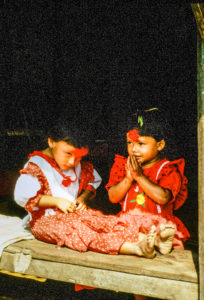
Here’s the original scan of a 35mm color slide (transparency) shot during a 1991 trek in Nepal’s Anapurna region.  The image is grainy and the background behind the girls’ heads is distracting.  I decided to clean it up a bit using Lightroom.

NepalWith just a few minutes of tweaking using Lightroom, I was able to crop the image for more dramatic impact, render a true black background, reduce the grainy noise in the shadow areas, and enhance the saturation of the colors.  Buy this photo

    • The images were shot digitally but were made before I started routinely using image-processing software such as Lightroom.  In these cases, I like to apply post-processing to see what artistic options I may have missed in the earlier digital years.

This old Scandinavian stave church was shot as a color image in 2005.  It is so high-contrast that it appears nearly monochromatic on the display screen.  It’s a striking image, but looking at it today I wondered how much more effective it would be as a true black-and-white photo, so I decided to revisit the image using Lightroom.

Here’s the same digital image file, but converted to black-and-white using Lightroom’s color channel processing module.  I boosted the contrast even further and then adjusted each color’s saturation in the black-and-white mix to achieve the exquisite texture of the snow on the ancient building’s roof.  Buy this photo

  • The images are more recent, but I want to make some new creative choices.  Here the idea is to render the image in a different way to achieve a different end result.  For example, an image I initially processed in color may turn out to make a lovely black-and-white photo.  Or perhaps I crop a crowd scene to emphasize just one or a few of the people within it.  The choices are nearly limitless.

Reviewing my favorite images from a recent trip to New Orleans, I saw this shot of a characteristic French Quarter balcony and realized it would be even more powerful if certain colors were more saturated.

A brief session in Lightroom’s Develop module was all it took to boost the saturation of the blue and red channels and to adjust the shadow and black point tonalities.  The resulting image more closely reproduces the emotional experience I recall when viewing this scene live.  Buy this photo

Take a look at some of your older images.  Which ones would you like to revisit and give a fresh new look?  Do you regularly return to work on your library of existing images?  Please share your thoughts here.

Want to read more posts about post-processing your images?  Find them all here: Posts on Post-Processing.

Purple Mountain’s Majesty [Encore Publication]: Including mountains in your images

Whether we’re traveling halfway around the world or just a few miles from home, we travel photographers get excited about including mountains in our images.  Mountainous landscapes can provide so many of the most basic elements we look for in a great photograph: beautiful light, compelling composition, exquisite textures, and an authentic sense of place.  In this post we will cover some of the fundamental techniques for capturing great images of mountains.

As with most kinds of photography, it all begins with beautiful light.  Whenever possible, try to shoot mountain landscapes near sunrise or sunset, or when something interesting is happening with the weather conditions.  The quality of light tends to be best during these times.  You’re more likely to capture lovely colors on the peaks and in the sky, and the image is more apt to give a sense of depth and drama than during the middle hours of the day.

Shooting from the deck at our lodge in Torres del Paine National Park in Chile, I had to miss most of an excellent dinner to capture Lago Grey with its mountains and glaciers during the “golden hour” just before sunset.  The lovely interplay of colors and textures, from the sky to the peaks and to the icebergs and water, made the resulting image worth the effort.  Buy this photo

When shooting mountain landscapes, it is usually a good idea to bracket your exposure.  With the camera fixed on a sturdy tripod, compose your scene and then shoot a series of images, each with a slightly different exposure.  Many cameras have settings to automate the process of bracketing.  The two main benefits of exposure bracketing are raising the odds you’ll have a perfectly exposed image and allowing you to create a high dynamic range (HDR) image from several different exposures.  See this post for a refresher on how to use exposure bracketing: Post on Exposure Bracketing.

This HDR image of Yosemite National Park’s peaks reflected in the Merced River was created from a series of different exposures made using bracketing.  The camera was mounted on a tripod and I made a series of seven shots, each one exposed 2/3 of a stop brighter than the previous one.  Buy this photo

I’m often asked how to make mountain images that really “pop”.  Why are some photographs of mountain landscapes so dynamic and compelling, with intriguing contrast between the peaks and the sky?  Of course, there are many elements that go into the making of an excellent image, but there is a “secret sauce” that can dramatically improve many mountain images: the polarizing filter.  Properly using a circular polarizing filter on your lens can emphasize the contrasting parts of the rock, snow, and/or ice on the mountains and can also add drama to the clouds and sky.  Every image shown in this post was made with a polarizer.  Be sure to adjust the filter by turning its outer ring until you see the effect you want to achieve.  Usually this involves rotating the filter’s ring until you see the maximum polarizing effect possible and then dialing it back a little (or a lot) until you achieve a balance between added drama and a natural look.  Experience helps here.  Check out this post on the use of filters, including polarizers: Post on Filters.

This image of a rare lenticular cloud forming on the summit of Osorno Volcano in Argentinian Patagonia was made using a polarizing filter to bring out the cloud formation and darken the sky.  Buy this photo

Mountain colors can be glorious, but also consider converting some mountain images to black-and-white during post-processing.  Rendering in black-and-white can emphasize the textures on the crags and peaks of a mountain and can also lend drama to the foreground and sky.  Shots captured with a polarizing filter will usually result in more intriguing monochrome images.  When converting to black-and-white during post-processing, be sure to play around with the contrast and individual color channel sliders until you achieve the result you want.  For more info on black-and-white photography, check out this post: Post on Black and White Photography.

This shot of a rock dome in Yosemite’s Tuolumne Meadows area is striking when rendered in black-and-white.  Buy this photo

Sometimes when we’re traveling we don’t have the option of returning to a gorgeous mountain location when the lighting is perfect.  Don’t let the flat lighting of a bright mid-day sun stop you from shooting the local peaks.  Great images can be made at any time of day.  Just make sure to follow the main techniques outlined in this post: compose well, use a polarizing filter, and bracket your exposure.

Patagonian peaks captured on our way out of Torres del Paine National Park.  Because we didn’t have the option of returning at the golden hour, I made this image in the harsh mid-day sun.  With careful attention to composition and the use of a polarizing filter and exposure bracketing, I was able to make a favorite image in spite of the less than perfect lighting conditions.  Buy this photo

What are your go-to methods when shooting mountain scenery?  What are your favorite mountain locations?  Please share your thoughts in the comment box here.

Want to see more posts about photographic techniques?  Find them all here: Posts on Techniques.


Focus on Svalbard [Encore Publication]: Breathtaking beauty at the top of the world

My wife and I area avid eclipse chasers.  One of the joys of seeking out total solar eclipses is their geographic dispersion: each total eclipse can be viewed only from a narrow band of land or sea whose swatch could cut across any corner of the globe.  This means the dedicated eclipse junkie could, and eventually will, end up traveling to nearly any given remote spot on the planet.  In March, 2015, we had the opportunity to observe and photograph a total solar eclipse in Longyearbyen, the only population center in Svalbard, the vast island in the Norwegian Arctic.  This wonderful trip was conducted by A Classic Tour Collection (http://aclassictour.com/travel-company/), specialists in eclipse tours. Home to more polar bears than humans, Svalbard is a place of remarkable pristine beauty located closer to the North Pole than it is to mainland Norway.

In a previous post I provided a primer on eclipse photography.  You can review that post here: Post on Eclipse Photography.  And don’t forget to book your travel for the upcoming Great American Eclipse on August 21, 2017.

Today’s post focuses on Svalbard’s photographic treasures.  The village of Longyearbyen itself is very distinctive.  The world’s northernmost permanent settlement, it was built to enable the mining industry in the region.  The landscape and architecture are very unusual and starkly beautiful.

This row of miner’s cottages, each painted a vibrant color, makes a nice subject.  I overexposed the foreground and background snow to emphasize the richly saturated colors of the houses.  Buy this photo

Any Arctic location affords the possibility of seeing the Aurora Borealis (Northern Lights).  The conditions must align properly: dark sky, clear weather, and it helps to be near a peak in the solar cycle.  While I’ve seen more impressive displays in the past, the aurora we observed in Svalbard was still impressive.

To capture the Northern Lights, use a fast wide-angle lens and a sturdy tripod.  As a starting point for exposure, try an ISO setting of about 800 and shutter speeds from about 4-15 seconds.  Experiment to see what works best.  Buy this photo

The stark icy landscapes surrounding Longyearbyen are otherworldly.  I photographed this glacier-covered mountain near sunset, and we enjoyed the excitement of climbing it the next day.

To make this image of an icy butte on the outskirts of the village, I used a tripod and exposed using spot metering for the rocky parts of the mountain.  Buy this photo

When shooting in very cold climates like Svalbard in March, it’s important to keep both your gear and yourself safe and functional.  Check out this post on shooting in extreme conditions: Post on Extreme Conditions.

One of the trip highlights was a polar bear safari by snowmobile.  Zipping along pristine ice fields at speeds up to 75 km/hour while the Arctic sun slowly set was thrilling.  Our turnaround point was an old campsite on the shore of the Barents Sea.  It truly felt like the edge of the world.  Due to an incident earlier in the day, in which a group of campers was attacked by a polar bear and forced to shoot it, we did not encounter any of the skittish bears that night.  We did, however, see the doomed animal’s footprints in the fresh snow.

My wife hikes alongside the tracks of a polar bear shot to death earlier the same day.  This dramatic image was made in near total darkness, so I was forced to use flash as the main lighting source.  In these situations, I dial down the power of the flash by at least one stop and try to position it for maximum dramatic impact.  Buy this photo

One of my favorite images from the trip, this was made on the shore of the Barents Sea at sunset.  Landscapes like this one need to be composed especially carefully to best showcase elements in the foreground, middle ground, and background.  I chose a vantage point low to the ground to emphasize the ice floes.  While I also experimented with using a bit of fill flash, I preferred this image with natural light only.  Buy this photo

On eclipse day, there is a palpable air of excitement.  Here is a shot of astronomer and leading eclipse expert Jay Pasachoff preparing for the eclipse along with one of his students.

Even during an exciting event like a total solar eclipse, it’s important to remember to document the people and activities in your group.  Buy this photo

The diamond ring effect signals the start of the period of totality.  Buy this photo

After the eclipse viewing, we enjoyed a dogsled ride back to Longyearbyen village.  I wanted to capture the feeling of exhilaration as the dogs pulled us rapidly along the snow fields into a wide-open horizon.  To capture that emotion, I shot from the perspective of the rider, handheld, using a fast shutter speed and a fairly wide focal length.  Buy this photo

Wildlife is a favorite genre of photography in nearly any region.  During our ascent of a glacier-covered mountain, we were fortunate to observe several Svalbard reindeer, the world’s smallest subspecies.  I used a telephoto lens and exposed for the animal’s fur, as using an auto mode would have underexposed the main subject due to the bright snowy background.  Buy this photo

Longyearbyen is the world’s northernmost settlement, so it stands to reason it would contain the world’s northernmost church.  Care must be taken when photographing architecture using a wide-angle lens not to distort the perspective.  Buy this photo

Your intrepid author photographing the total solar eclipse.  Buy this photo

Parting shot: After returning from Svalbard, I created this montage of several images each depicting a different phase of the eclipse.  Buy this photo

I hope this article inspires you to want to visit Svalbard.  While extra effort is required to visit the world’s most remote and extreme destinations, the returns are enormous in terms of the beauty and unique photographic experiences.

Have you visited Svalbard or other Arctic destinations?  What was most memorable?  Please share your thoughts here.

Want to read more posts about travel photography destinations?  Find them all here: Posts on Destinations.

Brave New World [Encore Publication]: AI tools for photographers are improving

As a working professional photographer who also spent nearly 30 years as a technology manager/executive, I’ve long had an interest in the intersection between art/creativity and technology.  Recent attempts to marry photography with artificial intelligence have ranged from useful (facial recognition) to silly (Instagram filters) to hype (an expensive camera that several days after you shoot sends you only the images it deems worthy).  But as pattern matching algorithms improve and machine learning becomes more reliable, we are starting to see some amazing applications at the intersection of AI and photography.

I’ve recently been playing around with two good examples from Adobe.  Available only in the online version of Lightroom as “Technology Previews”, these tools enable you to search all your images for specific attributes and to have the AI automatically select what it determines to be your best photos.

To activate these new tools, go to https://lightroom.adobe.com, log in using your Adobe Creative Cloud credentials, and then click on the Lighroom logo in the upper left and select “Technology Previews” from the drop-down menu.  Click the check box next to “Best Photos”, and you’re good to go.

There are two main tools available at this time:

  1. Intelligent Photo Search: This is already very impressive technology.  You can search all or a subset of your images using any natural language term you want.  You could, for example, search all your images for photos of cats, or of mountains, or of dancers, or of waterfalls.  The more specific your search term is, the more accurate the results are likely to be.  When I searched for “waterfall” or for “dancer”, the AI seemed to get many or most of my photos featuring those themes, and only occasionally did it include photos that did not feature those themes.  When my search terms were broader, like “clouds” or “mountains”, the results were less accurate.  Aesthetic searches, say for the color “blue” or the effect of “motion” resulted in mostly accurate selections of images featuring these concepts.  While there are a few false matches, and likely quite a few more errors of omission of images that should have matched, this technology is quite useful in its current state.
  2. Best Photos Selection: This one is more of a work in process.  You can select any of your online galleries and ask the AI to select what it “thinks” the best photos are.  You can move a slider to increase or decrease how selective this tool is.  As a default, it shows you its picks for the top half of your photos, and then you can refine the selectivity to include more or fewer photos.  I tried this advanced technology using several of my recent photo galleries.  In most cases, it included my two or three favorite images in its initial selection of the top half of all the photos, but dropped them from its cut as I increased the selectivity.  In one gallery, for example, an image that was recently selected as a favorite by the editors of “National Geographic” was dropped by Adobe’s AI in the first cut of 10% of the images.  That image was quite artsy and abstract, and it’s not reasonable to expect that a machine could choose it as special.  Yet in another of my galleries, the AI included an image that recently won a major local competition in its final cut of just 1% of the images.  That image is a more traditional landscape that could reasonably be evaluated by a machine as a “good” photograph.

The bottom line here is that the applications of advanced technology to the art of photography are improving at an astonishing rate.  While neither of Adobe’s AI tools is as good as a human artist at selecting images by their features or their quality, both tools are off to an impressive start and one of them (Intelligent Photo Search) is already very usable.  I would not be surprised if, in a year or two, this technology advances to the point where machines can be making decisions about photography along with humans.  Both human and AI evaluations will have their strengths and weaknesses, and I can see them coexisting for the foreseeable future.  I recommend we all, as photographers, get steeped in this advanced technology and prepare for a future in which man and machine will both play a role in sophisticated evaluation of images.

Focus on 2018 SF Pride Parade [Encore Publication]: Capturing diversity, purpose, and intimacy

It’s no surprise that San Francisco hosts one of the world’s oldest and largest LGBTQ Pride events in the world.  Each year, the parade and festival grow bigger and better attended.  SF Pride is one of my favorite annual events in my home region, the SF Bay Area, and what I love the most about this exuberant celebration is its remarkable focus on the central human values of diversity, inclusion, activism, hope, and love.  In today’s post, I share some of my favorite images from this year’s Pride Parade, along with a few words about how the images were made.  The goal is to showcase the incredible diversity and sense of social purpose of the participants and observers at this grand celebration, while also striving to capture the small, more intimate, moments.  Remember that you can view–and purchase–all of these images as well as many more by clicking on any of the images in this post.

In a frenzied environment like that of most festivals, parades, and street fairs, it can be a challenge to make a nice clean portrait with an uncluttered background.  Sometimes it’s possible to relocate the subject to an area with a clean and clutter-free background, but most often (as with this portrait) that isn’t feasible.  In those cases, my best practices are to use a moderate telephoto “portrait” lens, select a wide aperture (small F-stop number) to throw the background into soft focus, get in close to the subject, and use a touch of post-crop vignetting during post-processing.  

Huge festivals and celebrations such as SF Pride can be overwhelming, with hundreds of thousands of participants and observers present.  I strive to capture the smaller, more intimate, moments within this gigantic environment.  Here I captured a beautiful portrait of two participants sharing their love, which I think encapsulates the entire meaning of Pride events around the world.  I had been chatting with these two people and had obtained their permission to photograph them before making this image.  I used a medium telephoto “portrait” lens and got in close to isolate the couple from the busy background.

Color and texture play a huge role in photographic composition and expression.  As photographers, we’re very aware of these factors when we compose landscapes or nature scenes, but even when making a portrait, we should always be considering the mood evoked by the colors, patterns, and textures in the scene.  I love this portrait for its moody use of the similar shades of orange-red offset against the multiple colors of the flowers and the cigarette.  This is an image that tells a story, but that also leaves most of the story untold.

Another intimate portrait, this one made of a young woman doing yoga poses while waiting to march in the parade.  She had an adorable sense of humor and expressive face, which, coupled with her offbeat outfit, made a great closeup portrait.  Don’t be afraid to get in close to your subject, but always get to know them and ask permission first.

An iconic Pride scene, this portrait was made with a longer telephoto lens, its use made necessary by the greater distance to the parade float in the middle of a wide street.  While I prefer to get up-close and personal with my subjects, and to get to know them before shooting, sometimes we have to shoot from farther away, such as during a fast-moving and crowded parade.  It’s therefore important to have the gear and expertise to make portraits from any range.  Even when shooting from farther away, though, my key portrait rules still apply: try to capture the portrait with as uncluttered a background as possible, use a wide aperture to isolate the main subject from the background, and apply a bit of post-crop vignetting during post-processing.

It can be tricky to try to capture nudity in a tasteful way suitable for sharing and selling to broad audiences.  I spent some time chatting with these two activists to get to know them and to understand their cause–overturning San Francisco’s ban on public nudity–before starting to shoot.  Even though they had given me permission to photograph them nude (which is an important courtesy all photographers should follow, although no permission is legally required to photograph people in a public space in the US), my market for images containing graphic nudity is small, so I strive to capture scenes that tell the story but with implied nudity rather than graphic nudity.  Here I found a vantage point that allowed the subjects’ arms to strategically cover certain parts of their bodies.  The resulting portrait conveys the story of their purpose and gets across the idea of their nudity, but is still shareable and sell-able to a broad market.

Another close-up portrait, using the same techniques I shared earlier in this post.

Another of my favorite portraits from the day, this one also tells a small-scale, intimate story, conveyed by getting in close and isolating the subjects from the busy background.  The end result is a sense that these two people are celebrating their own story, even in the midst of the bustling celebration going on around them.

I met this young woman in a very crowded space, but fortunately I had the opportunity to walk her to a less cluttered space to make her portrait.  I’m always on the lookout for quieter and cleaner spaces when shooting festivals and celebrations.  A few steps was all it took for us to find this simple, clean background, allowing the portrait to really pop.

Group portraits pose a special challenge in busy public spaces: how to capture all the group members in crisp focus while also trying to isolate them from the cluttered background.  Here I used a medium aperture to keep the people in sharp focus while slightly softening the background, but since a very wide aperture cannot be used for groups, the softening effect will be mild.  As a result, it’s especially important when making these group portraits to seek an interesting, complementary, or clean background.

As their float passed by in the staging and assembly area before the official start of the parade, I observed an opportunity to capture this quiet scene of one woman helping to apply her friend’s makeup.  I used a moderate telephoto lens and shot several frames to increase the odds of getting a clean and interesting shot.

When making portraits of kids or seated people, it’s a good practice to get down to their level.  Getting in close is also usually an effective technique, both to isolate the subject and to capture a sense of their spirit.

What are some of your favorite celebrations, and how do you capture their diversity in your images?  Please share your thoughts here.

Want to read more posts about what to shoot while traveling or close to home?  Find them all here: Posts on What to Shoot.

Approach with Care [Encore Publication]: Sensitive photographic practices help keep wildlife wild and healthy

Photographing wildlife in its natural habitat is one of the most exciting and rewarding activities I can imagine.  From researching the species’ behavior to seeking it (sometimes for days) in the field, to that wonderful moment its image is captured on our memory card and to the thrill of viewing that image when we return from the field, there’s something truly magical about this genre of photography.

Observing and photographing animals in the wild, such as this rare wildcat along Turkey’s Turquoise Coast, is thrilling.  Strive to put the animal’s welfare ahead of your image-making.  Buy this photo

Done properly, wildlife photography can have zero to very modest negative impact on the creatures whose images we capture.  In fact, photographers have done a great deal over the decades to help preserve wildlife through sharing images that inspire local people, governments, and the public to protect endangered species.

But by stalking and encroaching on a species’ territory, we photographers also put wildlife at risk of harm.  Improperly engaging with animals with the intent of photographing them can cause a predator to starve by allowing its prey to escape, cause another creature to become prey by distracting it from its natural wariness, stress the animal to harmful levels, or acclimatize them to being around humans.

Here are some important guidelines for photographing wildlife in as safe a manner as possible:

  1. Do your homework: The more you know before you set out to encounter a creature, the less likely you are to cause it harm inadvertently.  If you will be going with a safari or tour, research the outfit first to make sure they follow the highest ethical standards.  Get to know the behavior of the species you are seeking.  What is their daily and seasonal routine?  Where is their habitat?  What do they eat and what eats them?  What is a safe distance from which to view them?
  2. Keep a respectful distance: As kids we were told to keep away from wildlife for our safety, but as photographers we also need to consider how far away we must stay in order not to cause the animals undue stress.  Knowing where their meal ticket comes from, some safari and tour operators are willing to break park or preserve rules and approach the animals very closely so their clients can get great photos.  Do not encourage this.  Aside from the harm this stress can cause the animal, a stressed animal will look stressed in your photo and is more likely to bolt and leave you with no photo at all.  So, use a long telephoto lens, keep your distance, and both your subject and your images will be the better for it.
  3. Show special respect for the young: Baby animals are extremely vulnerable and should be treated with special care.  If you are traveling with a tour, defer to your guide’s knowledge.  If you’re on your own, be sure you’ve done your homework first, and err on the side of caution.Young animals, such as this baby baboon in Tanzania’s Serengeti National Park, should be photographed with special care.  I made this image using a long telephoto lens and shot from a safari vehicle parked at a respectful distance.  Buy this photo
  4. No kidding–don’t feed the animals: It seems almost too obvious to have to state, and yet nearly every day I encounter humans attempting to feed wildlife.  In Yosemite National Park, a number of bears must be killed each year because they have become dependent on humans for food.  At your local city park, you’ll probably observe people trying to feed the birds or squirrels.  And of course there are the big news stories (the recent major one was about the killing of the beloved Cecil the Lion) about hunters baiting animals with food.  A well placed and properly maintained bird feeder in the backyard may be okay, but no other attempts should be made to feed wildlife.
  5. Come back another time: In today’s networked world, word about rare animal sightings travels quickly.  If you hear about a sighting while traveling or near home, chances are many other photographers and watchers have also heard about it.  Multitudes of humans crowding around an animal will put it under undue stress and will also ensure you won’t make a great portrait of it.  Come back another time when there are fewer other people.  No photo opportunity is so irreplaceable that we should put the wildlife at risk.

With a little knowledge and courtesy, photographers can make great wildlife images while helping preserve and protect their subjects and keeping the wildlife wild.  Conversely, without respect or information about the local fauna, we run the risk of putting them at grave risk.  As the saying goes, make good choices!

The world’s smallest species of reindeer, the Svalbard reindeer is at risk due to global climate change.  Cautious and respectful photographers can use their images to help protect and preserve at-risk species.  Buy this photo

Do you have best practices about shooting (with a camera, that is) wildlife in the field?  Have you observed human behavior–positive or negative–that serves as an example?  Please share your thoughts here.

Want to read more posts about what to shoot while traveling or near home?  Find them all here: Posts on What to Shoot.


Luck Favors the Prepared [Encore Publication]: Tools for planning your shot

It was Louis Pasteur who said, “Fortune favors the prepared mind.”  We usually hear the quote paraphrased as, “Luck favors the prepared.”  For travel photographers, there is often a great deal of luck involved in capturing a truly great image, but there are some very useful tools that we can use to help us plan to be in the right place at the right time with the right gear.  Let’s look at just a few of my favorites.

I’ll start with a quick review of the most obvious resources.  I would never plan an hour-long photo shoot, let alone a month-long trip to a far-flung travel destination, without doing some research.  What are the must-see locations, and what dates and times of day are perfect for each one?  What are the events or activities that most authentically represent the locations I am visiting?  Is there a livestock market, a street festival, or a religious celebration taking place while I’m in the region?  How can I build an itinerary that best incorporates all of these locations?  Great resources for this type of research include guidebooks (online and hardcopy), online review sites such as Trip Advisor and Yelp, mapping and navigation apps (Google Maps is still my all-around favorite, but several others have their own advantages), and local weather sites.  I like to build my itinerary by customizing an online map to show all of the locations I’d like to visit, then creating a routing that links the locations in the proper order.  If travel by air, rail, bus, or boat is involved, I research those schedules and fares to determine the best way to get from one place to the next.  Airline consolidation sites such as Orbitz can be quite helpful for finding the best flights at the best prices.  If the itinerary has been pre-planned by a travel company, then I will still do most of this background research to better understand the locations we’ll be visiting.

Once I know where I’ll be going and what events I plan to shoot, I develop a shot list.  Some photographers craft very detailed and specific shot lists, but I like to keep it quite flexible and informal, often simply jotting down my ideas in the calendar event on my phone that is associated with each planned shoot.  After all, if I adhere too closely to a shot list, I will just end up with the same images that hundreds or thousands of other visitors have captured after doing the same research.  Serendipity and the artist’s eye have their place in travel photography, too.  The research phase can also inform me as to what clothing, gear, and other essentials I should bring to each location.

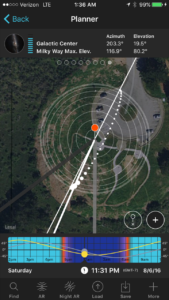
Now I’d like to introduce three smartphone apps that I consider indispensable for travel photography.  First, there’s Photo Pills, an app that incorporates several essential tools into one package.  I use Photo Pills for planning shots where I need to know how to get all the elements, including location, date, and time of day, to come together.  For example, during the Perseid Meteor Shower, I wanted to find a dark sky location with a nice foreground and a view toward the galactic core of our Milky Way.  This way, I could capture images including the meteor shower, the Milky Way, and the pretty landscape in the foreground.  I had a location in mind, a beautiful spot where there isn’t too much light pollution and with a gorgeous view over a reservoir and the Santa Cruz Mountains.  The Planner tool in Photo Pills allowed me to visualize the foreground as viewed by my phone’s camera, superimposed against the Milky Way as it would appear on different days and times of day.  I planned the shot for a certain time on each of several consecutive days, confirmed that the Milky Way would be rising in the desired direction and that the nearly full moon would have already set, and then waited for clear weather.  The first night of the meteor shower was cloudy, but the second night was the charm, and I was able to capture this striking image.
Using the Photo Pills app on my smartphone, I was able to plan in advance for a location, date, and time that would maximize the chances of capturing the Perseid Meteor Shower and Milky Way over the lovely Crystal Springs Reservoir.  Buy this photo

Here’s a screenshot of the Planner tool in Photo Pills that I used to prepare for this shoot.

img_3452

The Photo Pills app has a number of tools to help plan and execute your shots.

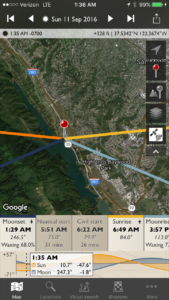
Another useful app for planning the best locations, dates, and times for your shoots is TPE (The Photographer’s Ephemeris).  I find this tool to be especially helpful for visualizing the path of the sun and moon across the field of view for any location I select.  This app is very powerful, and I have only scratched the surface of what it can do to predict and prepare for photo opportunities.

img_3453

The Photographer’s Ephemeris (TPE) is a powerful tool for planning any outdoor photo shoots.

A final app I will mention here is called Easy Release.  Sometimes (read this post for details about model releases), we need a model release when a person or several people are clearly identifiable in a photo.  I know some photographers who carry hardcopy model releases with them wherever they travel, but I find this to be cumbersome and impractical when on the road shooting.  Instead, I use Easy Release on my phone, so I’m always ready to quickly prepare a release for a new friend to sign when they appear in my images.  Even though the app has the ability to translate the text of the release into several languages, there are situations in which it isn’t reasonable to try to explain to a local person what’s in the release and why it’s required.  Furthermore, I consider it to be exploitative if the person can’t reasonably be expected to understand what’s in the document or why they should be signing it.  But there are times when having immediate access to a model release that can be prepared, signed, and stored right on my phone is a big advantage.

img_3454

Easy Release is a convenient tool for creating, signing, sharing, and storing model releases when a person is clearly identifiable in photos.

With proper planning using readily available resources and various apps including the ones I’ve presented here, we can be better prepared to maximize our chances of capturing memorable images.  Happy shooting, and remember that luck favors the prepared!

Do you have a favorite tool you use to plan for your photo adventures?  How have you used this tool to get your shot?  Please share your experiences here.

Want to read more posts about tools for planning your travel photography?  Find them all here: Posts on Planning.

Photographic Blasphemy [Encore Publication]: Why you don’t need a tripod for most travel photography

Warning: The following assertion will sound heretical to many photography enthusiasts.  Stop reading now if you can’t handle the truth :-).

I’m going to say it.  You don’t need to carry a tripod for most travel photography situations.  There, I’ve said it.

This is blasphemy to many photographers.  After all, for the past 15 years or so, the badge of a “serious” photographer has been this three-legged object we stick between our camera and the ground.  Most scenic overlooks and other landscape photography-friendly locations have been positively flooded by a veritable sea of tripods in recent years.  I’ve seen viewpoints so clogged by tripods that photographers and even (heaven forbid) non-photographers are forced to elbow their way through just to get a place to stand to watch the sunrise, sunset, or other pretty happening.  For years, I have carried at least a lightweight tripod, and occasionally a heavy-duty professional tripod, with me to nearly every shoot, which for me is usually about two per day.  It’s become an ingrained behavior, a knee-jerk reaction, for most photographers.  But why, exactly?

During my recent travels in India, I made many wonderful images in all genres of photography.  I used a lot of gear to do so.  One item I didn’t use: a tripod.  Buy this photo

There are times when a tripod is necessary.  In very low-light situations, such as true nighttime scenes, most astrophotography, and some indoor shoots, it is essential to mount the camera on a sturdy tripod.  When a very long shutter speed is required for a specific effect, such as blurring water in a waterfall or shooting a dancer using rear-curtain sync flash, then you really do need a tripod.  We can even include shoots where several images will be combined using software to make a high dynamic range (HDR) or panoramic image in the category where a tripod is helpful (though, I would argue, not really essential anymore, given how good software has become at stitching overlapping images together).

But so many other times, a tripod is not only not an asset but actually becomes a liability.  Travel photographers must be very mindful of the size and weight of the gear we carry on our adventures.  Every item we bring has to be considered in terms of its value: will the space it takes up in our limited carry-on baggage allotment and its weight on our back every step of our trip be worthwhile in terms of its usefulness in making the best possible images?  A tripod, even a lightweight travel tripod, is a relatively large and heavy piece of gear.  There are other items we need to leave at home in order to make room for a tripod.

I recently returned from a 2.5-week journey through the north of India.  I brought as much gear as I could reasonably fit in carry-on for the international and internal Indian flights.  It weighed a lot, and I had to lug much of the gear I brought on the trip each day on my back through 115-degree heat, sometimes up steep hills to the top of ancient forts.  At the end of the trip, I contemplated my usage of each item I carried.  Both DSLR camera bodies, every lens (even the massive 500mm super-telephoto which I required to make great images of far-off tigers), the speedlights, both battery chargers, and all remote releases, cables, filters, cleaning supplies, etc. were used at some point during the trip.  The one item I never once needed: you guessed it, the tripod!

True, India is a very densely populated country where most sites do not allow tripods or, if they are allowed, the crowds are too thick to deploy them.  And there was ample bright sunlight at most of our locations to handhold the camera.

But I would argue that a tripod is simply not needed for many travel photography situations in general.  These days, a camera’s sensor is so fast and noise-free, and the camera’s resolution so high, that camera shake for most landscape photography settings is a much smaller risk than motion of the subject itself.  My Nikon D810 has a resolution of nearly 37 MB, so if a single tree branch or sometimes even a single leaf moves, I can see it in the image.  A tripod is no more going to stop a leaf from moving than could the ancient viking king Canute stop the tide from coming in (a story frequently misused in modern times, by the way).

From now on, when I pack for a day’s shoot or a month-long journey, I’m going to seriously consider whether I’ll need a tripod and will pack one (or two) only when I can reasonably expect to need it.

What about you?  Do you always carry a tripod, or do you consider its appropriateness before you travel?  If you always carry it, do you always need it?  Would you bring some other piece of gear along if you didn’t have to make space for the tripod?  Please share your thoughts on this controversial topic here!

Want to read more posts about photographic gear?  Find them all here: Posts on Gear.

Twenty Years of World-Class Hip Hop Dance [Encore Publication]: Capturing the groundbreaking SF International Hip Hop Dance Fest

I’m honored to be a photographer for the twentieth anniversary production of the world-class SF International Hip Hop Dance Fest.  If you think hip hop dance is just about b-boys and b-girls, this festival will broaden your horizons to the diverse array of hip hop, from jaw-dropping acrobatics to artistic and subtly activist choreography.

As a photographer specializing in travel and cultural documentation, I love having the opportunity to capture images from a wide range of nations and cultural styles, so each year I’m eager to shoot the diverse participants in this show who come from all over the world and represent many different faces of hip hop dance.

Today’s post consists of a photo essay of a few favorite performance images from this  year’s festival.  Note that all of the images appearing in this post and many more can be viewed and purchased in this gallery.

First, a few notes about the making of these images:

  1. During dress rehearsals the photographer is free to roam about the theater, often including the backstage area, apron and wings, and even onstage with the performers.  This mobility is not possible during live performances.  As a result, there are more creative possibilities during the rehearsals, so that’s when I seek out the most exciting and dramatic shooting concepts.  Unfortunately, this year I was traveling on assignment in Panama during the festival’s dress rehearsal dates, so I was able only to capture images from the live performances.
  2. When shooting fast-moving performances in very low light situations, I like to use mostly fast prime lenses coupled with a high ISO setting to allow a fast enough shutter speed to freeze the motion.  In the case of these particular performances, I also needed to use a long telephoto zoom lens due to being assigned seats quite far from the stage.
  3. Theatrical productions often use mixed temperature lighting that can be challenging for photography because of the strange and complicated color casts that often result.  Sometimes this can be fixed in post-processing, but often I choose to convert to monochrome to avoid unpleasant and unnatural color casts.
  4. The difference between adequate dance photography and excellent dance photography is all about the dramatic purpose.  I try to adapt my shooting and post-processing style to suit the dramatic intent of each moment during the show.

I hope you’ve enjoyed this sampling of images from the remarkable SF International Hip Hop Dance Fest.  It’s a challenge and a genuine joy to have the opportunity to make images of important large-scale dance productions such as this one.  Thank you for reading, and please share your thoughts and questions about today’s post here.

Note that all of the images appearing in this post and many more can be viewed and purchased in this gallery.

The Raw Truth [Encore Publication]: Why you should always shoot in RAW mode

Editor’s Note: Since publishing the original version of this post several months ago, I have made a major change to my workflow and now shoot in RAW format only (i.e., with no JPEG version saved in addition to the RAW version of each image).  Shooting RAW+JPEG was a crutch that I used for a couple of years as I transitioned from JPEG to RAW format, but I realized I never use the JPEG files right out of the camera, and saving duplicate JPEG files takes a lot of disk space and time.  Please read my update in this recent post: Post on RAW vs. RAW+JPEG.  The original post on RAW mode follows:

======================

For many years after I took the plunge into digital photography, I had my camera set to store image files in the JPEG format only.  I now realize that during those years I was throwing away a lot of very valuable information with every photo I made.  There are two main reasons for this information loss.  First, the JPEG format does not store the detailed data for each pixel in the camera’s sensor but instead does some processing according to your settings and then saves only stripped-down information from each area of your image.  Second, the JPEG standard is what’s referred to as a “lossy” format; every time it is opened and resaved, the image loses more detailed data.  Once your image data is thrown away, you cannot retrieve it.

By contrast, the RAW file format keeps all the data your camera’s sensor “sees” for every pixel in the image.  Yes, RAW files are bigger and take a bit longer to store on your camera’s memory card than JPEG files, and yes, they take up more space on the memory card and on your PC’s hard drive later.  For those early years of digital photography, I avoided shooting in RAW mode because I was concerned about having reduced shooting speed and storage space for these monster-sized files.  I also was concerned that it would be too much work to shoot in RAW mode because RAW images require post-processing in order to look their best.  I now realize that I had been making a big mistake.  Shooting in RAW all the time, even when high speed is needed for action shots, ensures that you’ll always have the most image data to work with later.  You will be able to crop your images more tightly, print them to larger sizes, and especially important, refine the exposure and color with far more control if they were shot in RAW format rather than in JPEG or other compressed formats.

I now shoot nearly exclusively using my camera’s setting to save files as both RAW and JPEG.  Having the JPEG version of each image can be helpful if I want to share the photo right out of the camera.  It will look pretty decent without any post-processing because the JPEG file is stored with all of the camera’s settings for white balance, sharpening, and so on.  But when I come home from a trip, I always do my post-processing on the best images using RAW files exclusively.  Because the RAW format stores so much more information about the color and brightness of every single pixel of the image, I have much more freedom in how I choose to develop the image using my editing software (typically Adobe Lightroom, but occasionally I also use Adobe Photoshop).

Below, I show two files of the same image of my wife and me by a “fairy chimney” rock formation in Cappadocia, Turkey, both processed in exactly same the same way in Lightroom, but the first one was originally saved by the camera as a JPEG while the second was originally saved in RAW mode.  While the differences may be subtle at the size and resolution shown in this post, you can still make out more details in the RAW file, especially in areas shrouded in shadow.  The color of the sky is deeper.  Colors and shapes are rendered with more accuracy.  And of course, if we needed to crop or enlarge these images to a much bigger size, the quality of the JPEG file would deteriorate much sooner than would the RAW file.

 The JPEG version of this image.

 The RAW version of the same image.

I recommend shooting in RAW+JPEG all the time, unless you know you will need the slightly faster shooting speed or extra storage space of JPEG alone.  Doing so will give you the best of both worlds: a quick and easy JPEG to share right out of the camera, and the much more detailed data in the RAW file from which to bring out the nuances in color, texture, and exposure later during post-processing.  If you use JPEG alone, you’ll be throwing away image information you may wish you had later.

Do you shoot in RAW mode?  If so, what do you like about it?  If not, why not?  Please share your thoughts here.

Want to read more posts about photographic techniques?  Find them all here: Posts on Techniques.

Portrait Photography Gear [Encore Publication]: Affordable kit for making great portraits

Whether in my home town or traveling around the world, I love to shoot portraits.  There is something magical about creating an image that captures the essence of a person.  It can be daunting for many photographers to describe what gear they think is required to make professional-quality portraits: we often visualize a fully equipped studio with tens of thousands of dollars’ worth of high-end lights, modifiers, and backgrounds.  The reality is that we can make portraits of publication quality, shot on location and using kit that costs far less.  Here I outline a basic setup that is portable enough to pack on nearly any trip and costs only a few hundred dollars (not including your basic DSLR or mirrorless camera body).

Really all you need to get great people photos is a good portrait lens and a little know-how.  Make sure to set exposure and focus on your subject’s face.  I often use my camera’s Spot metering mode to get the correct exposure in tricky lighting conditions, such as when the subject is backlit.  In these conditions, it can also be helpful to fill in any harsh shadows on the subject’s face by using a touch of flash with a diffuser attached or a reflector.  That’s really all the gear you need: camera with portrait lens, flash unit, and a reflector kit.  Let’s look at the gear and basic techniques.

My indispensable portrait lens is the Nikon 85mm f/1.8G lens.  I shoot at least three-quarters of all my portraits, whether in the studio or on location, using this one piece of glass.  This is a classic portrait lens and provides a flattering perspective and great image quality when your subject is a person.  But this lens also shines for nature and action photography where you don’t need a really long focal length.  It renders really lovely “bokeh,” or the soft quality of the out-of-focus parts of the image.

This portrait of a grandmother and granddaughter at Carnaval San Francisco was made with natural light using an 85mm lens at a wide aperture to throw the background into soft focus.  Because no flash or reflector was used, there are some shadows on the subject’s faces, but I like the shallow depth of field that really emphasizes the subjects, and this would have been difficult to achieve with the slower shutter speed required to synchronize with a flash.  Also, carrying a reflector through the hustle and bustle of a chaotic street fair can be impractical.  I’m very pleased with this image even with a few shadows.

This portrait was shot using natural light only.  Some shadows are visible on the faces, but the effect is not unpleasant, and the soft focus from shooting without a flash is very effective.  Buy this photo

Your camera most likely has a built-in flash, and in many cases it is good enough to provide some fill-in lighting for backlit subjects or even to serve as a main light in very dark situations.  But for more control over how much light you want, the quality of that light, and where that light comes from and goes to, you likely want to have a separate flash unit.  I use the Nikon SB-910, which is powerful and flexible enough for most settings.  It has been discontinued and replaced by the Nikon SB-5000, but the older model is often still available.

Whatever flash you use, it is best to attach a diffuser of some sort to soften the otherwise very harsh light of the flash.  I also keep my camera set to lower the flash output by 1 stop, and I only override this setting occasionally.  Flash is often best when used sparingly.

This next image was shot at the same location as the previous one, but here I used an off-camera flash with diffuser to provide fill lighting on the subjects’ faces, thus reducing the shadows.  The only downside of using flash on location is that a slower shutter speed (typically about 1/160 of a second or slower) must be used, which in turn requires a smaller aperture (here it is f/8), and this can lead to more distraction from in-focus backgrounds.  I could have mitigated this problem by attaching a neutral density filter to block some of the light and allow a larger aperture.

This group portrait was made under similar conditions to the previous image, but here a fill flash was used to soften the shadows.  Buy this photo

An inexpensive accessory can provide the best of both worlds for on-location portraiture.  For less than $20 you can purchase a reflector kit with a variety of different colored reflectors and diffusers.  The reflectors are used to bounce some of the sun’s light back onto the face of the subject, thereby filling in any harsh shadows, while allowing you to shoot at any combination of aperture and shutter speed you choose in order to soften the background.  Each color of reflector imparts a different mood to the image.  An added bonus is that you can preview the precise effect the reflector has in your viewfinder or on your LCD screen.  Really the only downside of using a reflector in the field is that they are bulky to carry and often require an assistant to hold in place while you shoot.

This is the reflector kit I carry with me to most portrait shoots.  It’s high quality, very portable, and affordable.

This portrait was made by metering off the face of the model, choosing a wide aperture to blur the background, and bouncing some sunlight onto her face using the gold reflector from the kit mentioned above.

Using a reflector to bounce sunlight onto your subject’s face can reduce shadows while allowing you to retain full control over your aperture and shutter speed.  Buy this photo

There you have it: my formula for getting professional-looking portraits in the field with relatively inexpensive gear that’s easy to carry and use.

What is your favorite gear for portraiture?  Please share your thoughts in the comment box at the end of this post.

Interested in other posts about photography gear?  See them all here: http://www.to-travel-hopefully.com/category/gear/.


Celebration Time, Come On [Encore Publication]: How to shoot festivals, street fairs, and other celebrations

As a professional travel photographer, I have to be prepared at any given time to shoot in nearly every genre of photography.  Landscapes, urban scenes, street photography, night and astrophotography, sports, wildlife, and portraiture are all stock-in-trade, and I love them all!  But when I’m asked what my favorite photographic genre is, I reply that I love portraying living culture the most of all.  Making images of people celebrating their culture, especially when those images convey a sense of place, is my top objective when I shoot, whether I’m halfway around the world or near home.

Culture can be expressed in small everyday elements of dress, gesture, and environment.  But celebrations such as festivals, street fairs, religious observances, arts, and sports show us culture writ large.  It is these outpourings of color, sounds, motion, and ritual that show us how people are different and yet similar all around the world.  And of all the celebrations I shoot regularly, my favorite of all is the annual Carnaval San Francisco.  So in today’s post, we’ll explore how to shoot striking images of cultural celebrations, using Carnaval SF as an example.

This year’s Carnaval was held this past Sunday.  But I was privileged to be “embedded” with several of the comparsas, or Carnaval groups, during the months leading up to the big parade day.  This allowed me the opportunity to get to know the leaders and dancers in these groups, making very special images of the preparations for Carnaval.  While I won’t be including any of those behind-the-scenes images in today’s post, the images of the parade day itself did benefit from my having had the chance to get to know the members of these groups over the months leading up to the day.  We’ll include some discussion of this observation in the post.

I’d like to start with an observation on gear.  I see a lot of fellow photographers shooting at events like Carnaval with way too much gear.  When I say too much gear, I mean more gear than is good for them or for the participants and observers of the festival.  Several photographers had two or three DSLR bodies mounted with enormous zoom lenses and attached to large strobes with huge diffusers.  Some used monopods and a few even tried to set up tripods for this rapidly moving and crowded event.  I brought a single DSLR with two light and fast prime lenses (a 50mm “normal” lens, and an 85mm portrait lens).  That’s it.  I never mounted a zoom lens during the whole day of shooting and I never used any artificial light.  And of course I went handheld the whole day; there’s really no safe or practical way to use a tripod at a crowded and mobile event.  All 2500 images I made that day used just that compact kit, and I’m very happy with the results.

It’s a good idea to arrive well before the scheduled start time.  Often, the best images of the day will be the ones you make during the preparations rather than during the event itself.  For this image of a leader of the Viva la Diva group, who I knew well from working with them over the last few months, I got in close with an 85mm portrait lens and allowed her elaborate headdress to fill the entire frame.  Buy this photo

Try to include some of the elements surrounding the people in the celebration.  A portrait that shows a person or people within their surroundings is called an “environmental portrait,” and often these tell us more about the person and the culture than do close-ups.  Buy this photo

Seek out the key people in a celebration, such as the King of Carnaval shown here.  He has such an amazing presence that all I had to do was find the right vantage point and shoot away.  I always look for uncluttered backgrounds when making portraits, so the background doesn’t distract much from the image.  Buy this photo

Kids make wonderful subjects during celebrations, especially during those moments when they forget the camera is there and are completely uninhibited.  Buy this photo

Try to choose backgrounds that complement your subject without competing with it.  I asked this samba dancer to pose by a street mural whose bright blues complemented her own costume.  Buy this photo

Group portraits can be challenging.  It’s difficult during the chaos of a celebration to get everyone’s eyes on the camera.  Try to find a vantage point that flatters everyone in the image (for full-body portraits, it’s often best to shoot from the level of the middle of the body, not from head level), choose an uncluttered and undistracting background, and select an aperture that gives just enough depth-of-field to keep all the people in focus while softening the background.  Buy this photo

To make close-up portraits during the actual celebration (in this case, a parade), it is not necessary to use a long telephoto lens.  Shooting with a long lens means you’re “taking” the portrait, not “making” the portrait.  You simply can’t interact with your subject while shooting from far away.  I prefer to use a prime normal or portrait lens so that I can interact with my subject and make an image where his personality shines through.  It helped here that I knew the members of this group from our interactions over the last few months.  Buy this photo

Another reason to use a fast prime lens is that you can choose a very wide aperture (here, F/2.0 using an F/1.4 lens) to get tack-sharp focus on the subject’s face while softening the background and sometimes other parts of the body.  Here I wanted to emphasize the pointing gesture by having the fingers so close as to be out of focus, while the dancer’s face and body are in sharp focus.  Buy this photo

For images that really pop, use a large aperture (small F-stop number) to soften the background and separate the subject from the other people and objects around him.  Buy this photo

During the chaos and cacophony of an urban celebration, it’s nice to find those quiet moments, too.  While most festival dances are joyous and boisterous, this Latin American folkloric dance is quiet and mournful.  I wanted the portrait to reflect that mood, so I shot from the side as if walking next to the dancer and caught the quiet gesture of holding the white handkerchief.  Again, a large aperture was used to blur the background and emphasize the subject.  Buy this photo

I look for scenes where participants are just being themselves.  These girls were having a blast, marching and chatting with each other, but they also were interacting with the crowd.  I got down nearly to the ground so as to shoot from their level and framed the image so as to emphasize the color and pattern of their costumes.  Buy this photo

Most images of parades are shot from straight ahead looking backward onto the subjects.  You’ll observe in this post that most of my images are not made from that perspective, but occasionally it does work to frame a great scene, such as this delightful image of a salsa dancing couple.  Buy this photo

It can be challenging to include a whole parade contingent in one shot.  Here I was able to frame the whole group in formation, including some of the lovely San Francisco houses on the steep hill behind, by running ahead to the truck in front of the dancers and getting as much distance as I could between me and them.  I shot with an 85mm lens and selected a small aperture (large F-number) so as to keep all of the dancers and the background in focus.  Buy this photo

With bold and colorful costumes, some subjects cry out for a big striking close-up.  When this dancer stopped to interact with me, I got in close with a portrait lens and captured him full-frame.  Buy this photo

Don’t shy away from using non-standard aspect ratios.  To include the whole Muito Quente contingent, I moved back from the dancers and captured the whole width of the street, then in post-processing I cropped to keep the full width but remove the unwanted foreground and background portions.  Buy this photo

Again, it is helpful to know the participants in advance of the performance.  I had been working with the Muito Quente group for several months before the parade, which made it more natural to interact with each of the dancers and make the best images possible.  Buy this photo

Always shoot in RAW mode for maximum flexibility.  A few words about post-processing: Using Lightroom, I make small adjustments to the color and contrast curves so as to emphasize the subject.  A little boost to the vibrance (but not so much as to make the image appear unnatural) and a touch of post-crop vignetting can really make the image pop.  Buy this photo

Sometimes it’s okay to break the usual rules of composition.  A portrait is not supposed to be cropped at the joints, such as at the knee, but here it works because the dancer’s ornate flowing dress gives a sense of motion and fluidity in the bottom of the frame.  Buy this photo

Even in a fast-moving parade, find the opportunities to have your subject stop for a moment and interact with you.  The resulting images will convey much more personality that way, even if the personage is fully masked.  Buy this photo

We’ll close with this moment of sheer Carnaval magic.  It’s such a wonderful feeling when all the elements come together to make a memorable image.  This portrait uses most of the techniques we’ve discussed in today’s post–careful composition, bright vibrant colors, a perfect moment, sharp subject with soft background–and conveys a strong sense of personality, culture, and place.  And that is what Carnaval, and cultural celebrations in general, are all about!  Buy this photo

What are your favorite cultural celebrations?  How do you make images that capture their essence?  Please share your thoughts here.

Want to read more posts about what to shoot while traveling or close to home?  Find them all here: Posts on What to Shoot.

The Harsh Realities [Encore Publication]: How to shoot in extreme conditions

Travel is exciting because it exposes us to new environments from which we can learn about the diversity of the world and our own place within it.  But travel also can expose our expensive and sensitive photo gear to extreme conditions.  Heat, cold, humidity, dryness, wind, dust, sand, salt, water, and physical shocks are among the harsh realities of travel photography.  Let’s examine some of these hazards and discuss how to mitigate the potential harm.

  • Cold: Extremely low temperatures can cause all kinds of problems with modern electronics, including cameras.  Batteries don’t hold their charges very well in frigid conditions, so you need to carry extra batteries and keep them warm in your pocket or inside your parka.  Also expect to be recharging them more frequently than in warmer climes.  The LCD displays on your camera (and other devices such as your smartphone) can stop working partially or completely in very cold temperatures.  I’ve found there isn’t much that can be done when this happens except to try to gently warm the device, but that can be difficult when in the field shooting.  Fortunately, most of the time the display will return to normal functioning when it warms up.  Remember that very cold air is usually also very dry air, so be careful of condensation when getting out of the cold and returning to the warmth of an indoor environment.  The moisture that condenses on the inside of our lenses and electronic equipment can be damaging, so it’s best to let the gear warm up again while inside a sealed bag to prevent excessive condensation.  A large freezer-style bag works well for this purpose; just remember to place your camera and lens in the bag before coming inside from the cold.  Avoid lens changes in extreme cold conditions whenever possible.
  • Extreme cold, such as in Svalbard, can cause problems with the operation of batteries and LCD displays, and with condensation.  Buy this photo
  • Humidity: Excessive humidity can also cause condensation and fogging of the glass surfaces and displays on your gear.  In very humid conditions there is lots of moisture in the air, while in air conditioned vehicles and hotel rooms there is less moisture.  That means your lenses and LCDs will likely fog up quickly after leaving the air conditioned comfort of your hotel or vehicle.  To mitigate this problem, try to store your gear in an area that is less air conditioned, such as a storage area or bathroom.  And when you leave your hotel or car, keep the gear inside your camera bag to help prevent the buildup of moisture.
  • Wind and Dust: Recall that we’ve discussed many times in other posts the need to keep a UV (or haze) filter permanently attached to all lenses.  This protects the lenses from scratching damage, but has the secondary effect of protecting against dust building up on the front surface of the lens.  Dusty areas are also a good place to keep your lens cap on except when you are actually shooting.  Rule Number 1 in dusty environments is never, ever to change lenses outside unless it is absolutely necessary.  I like to carry two camera bodies with different lenses so that I can shoot with both lenses without the need to change in the field.  And if you do get dust on the camera’s viewfinder, lens, LCD, or mirror, you should have a good blower brush and soft lens cloth with you so you can clean it off.  I do not recommend trying to clean your camera’s sensor yourself unless you are confident you have the skills and equipment to do it properly.  Instead, turn on your camera’s sensor-cleaning function, if it has one, to try to prevent dust buildup, and heed the caution never to change lenses in dusty or windy environments.  A few small specks of dust on the sensor can even be removed in post-processing, although this becomes very difficult if the sensor is badly marred by the stuff.  I have a friend who is an ophthalmologist as well as an avid photographer, and he is one of the few people I know who will clean his own camera’s sensor.  I have a wonderful photo of him in full surgical regalia, using a microscope and surgical instruments to do the job.  For the rest of us, bring the camera to a good repair shop after your trip ends and before the next big adventure begins.
  • Physical Shocks: Travel is the school of hard knocks for camera gear.  Safari vehicles, “puddle hopper” bush planes, and long bus rides over bumpy roads are the norm for adventure travelers.  Once the gear takes a punishing blow that damages it, there is very little to be done in the field.  My best advice is to carry your gear in a very good padded bag with snug fittings around each piece, and to bring a backup camera body and lenses in overlapping ranges of focal lengths to ensure redundancy in the event of a mishap.

Game drives while on safari are near the top of every photographer’s “bucket list,” but the harsh realities of jolts, dust, and humid heat can threaten your sensitive camera gear.  Buy this photo

There’s an old saying, “If you can’t run with the big dogs, stay at home on the porch.”  If we were the types of photographers who wanted to avoid all these hazards, we’d just stay at home, right?  But travel photographers are the adventurous sort, and we consider these risks to be a cost of the intense pleasure we derive from shooting all kinds of fascinating subjects in new environments all around the world.  Plan well to minimize problems, bring extra gear for redundancy, and when something does go wrong keep a positive attitude: you’ll be well rewarded when you get home and have unique images as a souvenir of your efforts!

When have you faced extreme conditions for your shoots, and how did you overcome them?  Please share your thoughts here.

Want to read more posts about what to shoot while traveling?  Find them all here: Posts on What to Shoot.
 

2018: A Photographic Retrospective

Dear Readers,

My second year as a full-time professional photographer has flown by. In addition to major travels in Myanmar, Iceland, and Panama, I also had the opportunity to shoot more than 150 local SF Bay Area festivals, street fairs, performances, sporting events, and breaking news stories. Travel photography is my primary specialty: I lead photography tours in destinations around the world, shoot on assignment for travel companies, and place my images in magazines and on travel websites. While not traveling, I freelance for local newspapers, shoot for private clients (commercial and personal), and teach local workshops and classes. A second specialty has become capturing powerful images of performing arts for musicians, dancers, and theater companies. My photography website has logged more than 3 million page views, and I also publish a daily travel photography blog. I’ve had the opportunity to collaborate on projects with several wonderful artists, including an ongoing collaboration with talented dancer, choreographer, and Fulbright scholar Carly Lave on the intersection of advanced technology with human motion.


I was honored to have been named a finalist in the prestigious Emerging Professional Photographer competition run by Digital Photo Pro Magazine (wish me luck in the final round of judging!), and several of my images were selected as favorites by National Geographic’s photo editors and published in social media by LensCulture. My work was exhibited in several group shows and a solo show in the SF Bay Area.


It’s been a thrilling transitional year, and I’m very excited to continue my artistic and business growth in 2019. Please contact me to discuss booking me for any of your photography needs in the coming year, or if you’re interested in improving your own photography through workshops in SF or destinations around the world in 2019. I hope you enjoy this sampler of some of my favorite images from the past year!


Amazing Landscapes [Encore Publication]: How to make images that capture the spirit of the place

I love landscape photography.  To create a really successful landscape image, several elements have to converge: the lighting must have a pleasing quality, objects in the foreground and/or middle ground should be intriguing, leading lines should take the viewer on a journey through the image, and (usually) the sky must be dramatic and compelling.  I shoot a lot more mediocre landscapes than great ones, but when all the stars align (sometimes literally, during astrophotography shoots) and all those compositional elements are in place, the results can be amazing.

Let’s take a look at some of my favorite landscape images and talk about how they were made.
Buy this photo

While traveling in Svalbard to view the total solar eclipse of March 2015, my wife and I booked a safari via snowmobile to search for polar bears.  We covered 80 miles by snowmobile, much of that after dark.  The temperature averaged -5 degrees, with wind chill about 25 below zero Fahrenheit.  We rode out to an area now used as a campground, where an early settler and his wife lived a century ago.  This was glorious, otherworldly scenery encompassing ice fields, mountains, and the icy Barents Sea.  Svalbard is located so far north (closer to the North Pole than to mainland Norway) that the sunsets last for hours, so I set up my gear at the edge of the Barents Sea, composed the frame so that the eye is led out to the horizon by the slabs of ice and the range of mountains, and waited for the best light.  A polarizing filter added some drama to the sky.  A very long exposure was not necessary because there was no point to trying in blur the frozen water.  I shot several frames before the light became too dim and the temperature too bitter to continue.  This shot was the keeper!

Buy this photo

This landscape was shot during a recent trip through Turkey and is a good example of how sometimes we photographers just get lucky.  On arriving in the Cappadocian village of Üçhisar, we were thrilled to learn our hotel room was inside an ancient cave dwelling.  We awoke at 5:30 AM the next morning to the sight out our cave-hotel’s window of hundreds of hot air balloons launching above the “fairy chimneys” that dominate the Cappadocian landscape.  I got (mostly) dressed and rushed out onto our balcony, set up the camera on the lightweight travel tripod I carried on the trip, put on a wide-angle zoom lens, and started shooting as the sun rose.  I bracketed the exposure but because the light was perfect in this one shot, I did not end up combining multiple exposures into an HDR (high dynamic range) image.  Instead, this shot, one of the first of the morning’s session, was the clear choice.

Buy this photo

Chile’s Torres del Paine National Park is catnip for landscape photographers.  There are so many glorious subjects here that you can go crazy trying to photograph everything.  But Patagonian weather is notoriously changeable, and group travel doesn’t always afford photographers the chance to shoot at the right place at the right time of day with the right weather.  Fortunately, on our second night at the lodge on Lago Gray, I could see all the conditions were lining up for an epic image.  I skipped most of an excellent dinner so that I could set up my gear on the deck: camera with wide-angle lens, polarizing filter, steady tripod, and remote release.  I framed the image with a nice balance between sky, mountains, glaciers, lake, and foreground foliage.  And I started shooting.  I bracketed the exposure with 7-shot bursts, each one stop apart.  Later, in postprocessing, I combined a few of the shots from one burst into an HDR (high dynamic range) image using Lightroom’s photomerge feature.

Buy this photo

Closer to home, Yosemite is another photographer’s dream location.  While hiking to Dog Lake in Yosemite’s Tuolumne Meadows area, a freak hailstorm hit.  Suddenly the sky was hurling hailstones in biblical style and the formerly placid surface of the lake turned black with the force of the pelting ice.  What’s a photographer to do?  Start shooting, of course!  A tripod was impractical under these conditions, so I used a relatively fast shutter speed and shot handheld.  I took a series of bracketed exposures and combined them later using Lightroom into an HDR (high dynamic range) image.  For me, this image works because of the tension between the peaceful foreground of tree trunk and reeds, contrasted with the ominous sky and turbulent water.  The fallen tree and edge of the grasses provide nice leading lines from the peaceful to the violent portions of the frame.

Buy this photo

Another California landscape, this image was shot in the gorgeous Point Lobos reserve on California’s Central Coast.  As sunset neared, I set up camera and tripod right on the beach, shooting down onto the rocks and Pacific Ocean.  I used a neutral density filter to allow a very long exposure so that the water would blur.  I also attached a polarizing filter in an attempt to darken the sky and add drama to the image, but having two filters on the wide-angle lens did lead to some vignetting (the blocking of light at the edges of the photo), which I had to crop out in postprocessing.  This image was made from a single exposure with only minor adjustments to bring out the shadow details and saturate the colors.

Buy this photo

This year’s Perseid Meteor Shower was more active than we’ve seen in many years.  At the peak night of the shower, I headed out to a spot where a break in the trees allows a view over Crystal Springs Reservoir and the Santa Cruz Mountains.  We waited until about 2 AM so that the meteor activity was at a peak and the lights of the nearby towns were no longer bright.  Shooting with a wide-angle lens and a heavy professional tripod, I framed the image to include a pleasing foreground with trees, reservoir, and mountains, with most of the frame covering the dark sky.  I used a star finder app to shoot toward the galactic core of the Milky Way.  I set the camera to make 25-second exposures at f/4 and ISO 1600.  At this focal length, exposures longer than 25 seconds will cause the stars to appear blurry due to the motion of the earth.  And then I just kept shooting, one exposure after another, for nearly two hours.  Four meteors passed through the part of the sky in my image area during this time, and I combined the images that included them into one merged image using a software application called StarStaX.  While I like this image a lot, it could have been improved by finding a darker sky area (the lights from a nearby city caused the orange glow at the top of the mountains) and by bringing out the Milky Way a bit more prominently.  Now I know what to do during next year’s Perseid Shower!

A good wide-angle zoom lens is a must for landscape photography.  Many of the images featured in this post were shot with my Nikon 16-35mm f/4 lens.  It’s got great image quality and is well built, and I find it’s a great alternative (except perhaps for astrophotography where the extra speed is required) to the popular but very expensive Nikon 14-24mm f/2.8.

Want to see more articles on how to shoot travel images?  Find them all here: http://www.to-travel-hopefully.com/category/travel/shoot/

Now I’d love to hear from you!  What are your favorite landscape images, and why?  To what lengths have you gone to capture landscape photos?  Please share your thoughts in the comment box at the end of this post.

Focus on How Weird Street Faire [Encore Publication]: A case study on simple techniques to capture winning images of festivals

As a professional travel photographer, I shoot regularly in nearly all genres of photography.  A typical day on the road might include shooting landscapes, wildlife, cityscapes, portraits, action (sports, dance, performance), and nighttime photography.  While I enjoy all types of shooting, my great joy as a photographer is capturing portraits of the people I meet.  Whether close to home or halfway around the world, getting to know the people and learning about their culture through making portraits of them is a wonderful experience.  And there’s no better way to capture images of many amazing people in a short time than by attending local festivals.  People tend to be their best selves at special celebrations like festivals and street fairs.  They dress exuberantly, dance with abandon, make new friends quickly, and (nearly always) are overjoyed to pose for photos.

I shoot about a hundred festivals and other special events every year, so I’ve learned a few tips about how to make the best images during these occasions.  In today’s post I share some simple but effective techniques for capturing great portraits at festivals and other gatherings, using San Francisco’s recent How Weird Street Faire as a case study.  How Weird is a vibrant and colorful, only-in-SF, annual celebration of individuality, tolerance, music, art, and hula hoops.  Read on to see some of my favorite images from this year’s festival, presented along with some discussion of how they were made.  To view more of my images, or to buy some, check out this gallery: How Weird photo gallery.

I see a lot of fellow photographers at events like How Weird shooting with huge telephotos and even tripods, like they’re after images of wildlife on a Kenyan safari.  In my opinion, they are missing the point.  We’re making portraits of people here, so use a normal or moderate telephoto portrait lens, preferably a fast prime lens, ditch the tripod and monopod at home, and get in close to chat with and get to know the people you’re photographing.  When you interact with people, you get a sense of what makes them special, allowing both you and them to capture that special trait in your photos.  Random sniping from far away with a long telephoto will yield far more bland and generic photos.  All of my images at How Weird Street Faire were made with a single camera body and one lens, my trusty 85mm f/1.8 portrait lens.  Sometimes simple is better, especially when it comes to capturing people at fast-moving events.

Larger groups can be challenging to capture in portraits, particularly in bustling spaces like those of a festival.  When they couple I was chatting with suddenly ran into a friend and they had a group hug, I quickly stepped back a few paces and made this expressive and engaging portrait.  It’s okay to break the rules sometimes–here, one of the subject’s faces is completely obscured and another’s is partially obscured, yet the portrait works because it captures the energy and affection of the moment.

When photographers argue that the “street photography” approach (candidly sneaking images of people who aren’t aware they’re present) is the best for capturing people’s true essence, I show them images like this one.  This wholly genuine and unguarded moment of the girl dancing was made with her full knowledge and permission.  The trick is to chat with the subject and get their permission for photography first, then to lay back for a while and let them go back to what they were doing.  After a few minutes, they’ll nearly forget you’re there and they will reveal their true selves.  But unlike shots you sneak without permission, now you have a subject happy to have you photographing them, and you can take your time and not have to rush your work in order to hide your shooting from them.

Often we see only the most obvious subjects at crowded, chaotic events like festivals.  It’s easy to spend all our time shooting people dancing, partying, and displaying their costumes, but I try always to look for the more hidden people and infrastructure that support the event.  This DJ was partially hidden atop the big dance stage and behind the banks of speakers, but she made a fun subject for this portrait.

Don’t be afraid to get in close.  This portrait really pops because the tight composition allows us to focus our attention on the symmetry and color of the subject’s hair and costume.  

The interactions between people are at least as much fun to observe and capture as the individuals themselves.  I had chatted with and photographed a group of people for a few minutes when I observed this fun interaction, so I stepped back and framed some shots of the two young people together.

While post-processing my images after the shoot, I decided to render this one in monochrome to achieve a gritty urban street scene sort of feel.  Often color can distract from the power of an image, so always consider which of your images could benefit from conversion to black-and-white.

In ordinary daily life, I find that perhaps two-thirds of people are willing to have their portrait made if the photographer spends some time getting to know them first and then asks politely.  But at a festival, nearly everyone is excited about posing for portraits.  The trick is to capture scenes where they show you their underlying personalities a bit, rather than just striking a cliched pose for the camera.  To achieve that here, I spent a few minutes shooting, asking the couple to pose in different styles and have fun with it.

Putting it all together.  Here’s a summary of the basic techniques I use when shooting portraits at festivals:  1) Use a fast prime normal or portrait lens.  2) Set your camera for a fast shutter speed (1/500 second or faster is good for dancing and other fast action), wide aperture (f/2.5 or wider is ideal except for large groups) to isolate the subject, and an ISO appropriate to the lighting of the scene (I used ISO 100 the whole day due to the bright outdoor light).  3) Get to know your subject before shooting, let them relax, and capture them during an authentic moment.  4) Try to compose the portrait with as uncluttered a background as possible; of course, this is often difficult at crowded festivals.  5) During post-processing, crop to clean up the scene and then vignette just a touch to further clean up busy backgrounds.

I hope this discussion of techniques to capture portraits during festivals has been helpful.  The best way to learn these techniques and to find your own style is to shoot and shoot some more!

Please leave a comment with your own thoughts and tips about how to make great images of people at celebrations.

Want to read more posts about photographic techniques?  Find them all here: Posts about techniques.

Sweet Release [Encore Publication]: What is a model release and when do you need one?

We photographers are passionate about many aspects of our trade.  We love the artistic expression, that feeling of capturing a special moment that otherwise would be lost to time, even the gear we use to make images.  But one aspect of the trade that few of us–professionals and amateurs alike–enjoy thinking about is the legal side of making and selling images.  And one legal element about which we need to be knowledgeable is the model release.  Unless you never plan to make any images in which any person is recognizable, you should learn what a model release is and when you may need to use one.

First, a disclaimer: I am not an attorney and the advice I provide in this post is not intended to replace consultation with a competent lawyer.  What I provide here is just some practical advice I’ve acquired over the years, in which course I’ve made plenty of mistakes.  And you should also be aware that laws governing when you can photograph a person and how that image can be used vary from country to country and even among states or provinces within some countries.  With these points made, let’s explore the basic concept of a model release and when you may need one.

In the simplest terms, a model release is a legal agreement between a photographer and any person who will be recognizable in images made by the photographer.  It spells out the conditions under which the image can be published and often specifies the compensation to which the model is entitled.  In the US, a valid model release must be signed and dated by the photographer, the model, and a witness.  If the model is a minor child, a parent or legal guardian also must sign.  This agreement protects the photographer against being sued for defaming or cheating the model, but equally it protects the model from being taken advantage of.


When I work with a professional model, like Laura here, I always obtain a signed release before the photo shoot.  This practice ensures she will be properly compensated and protected against inappropriate uses of her likeness, while I and any publisher will be protected against defamation claims by the model.  Having the release means I have more flexibility as to how the image can be used later.  Buy this photo

So, when do you need a model release?  Here are some situations (not an exhaustive list) in which you should have one:

  • A person can be recognized in your image.  Note that personally identifiable information doesn’t derive only from a direct likeness of the person’s face.  He or she could also be recognized from a special feature such as a tattoo or from the context such as a clearly identifiable location.
  • … AND … one or more of the following statements is true:
    • You may wish to sell the image for commercial purposes such as advertising or use in a business’s publicity or promotion.
    • You may wish to enter the image in a competition or contest.  Check the specific competition’s rules; some require a model release whenever a person is clearly identifiable in the photo, while others do not.
    • You may wish to provide the image (even if you’re not compensated) for other people to use in a context you can’t control.  A model release protects you and those who obtain a license to use your image from being sued by the model for using their likeness in a way that they don’t approve.

In contrast, there are plenty of situations in which you don’t need to have a signed model release.  Some of these include:

  • One or many people appear in the image but none is recognizable.  The subjects may be far away from the vantage point or they may all be obscured or facing away from the camera.  As long as they cannot be identified individually, there is no need for a model release.
  • You plan to use the image only for your own portfolio.
  • You plan to use the image only for editorial purposes.  If your photo is published in a newspaper, magazine, or website where the primary purpose is editorial rather than commercial, a release is not required.  Imagine if every reporter had to get a signed release before publishing the likeness of every person appearing in any news outlet.  This would have a chilling effect on journalism, which is a pillar of a free and democratic society.  So in most cases, if your photo will be used for editorial purposes (that is, it will appear in a newspaper or magazine’s news section rather than in an advertising section), then you and the outlet’s publishers don’t need a release.
  • The images can be considered fine art photography.  Photos can be published and sold without express permission from the person appearing in them if the primary purpose is fine art.  In the US, case law upholds artistic expression as a form of First Amendment free speech in most cases.

Kashgar, China
Images with news value, such as this one made of a Uighur girl in Kashgar’s Old Town days before her home was to be demolished by the Chinese government, may be published and sold for editorial purposes with no requirement for a signed model release.  Buy this photo

When you do believe that a model release would be helpful given your intended future use of an image, it is quite a simple task to obtain one.  Some photographers carry printed forms with them so they can ask a subject to sign their release as needed.  I use an app on my smartphone called “Easy Release,” which you can purchase for $9.99 on the iTunes Store: Easy Release app for iPhone.  This app simplifies the process of creating a model release; getting it signed by your model, yourself, and a witness; sending it to others; and storing and managing it for future use.

Because “To Travel Hopefully” primarily treats the subject of travel photography, I want to share my own philosophy when it comes to asking for a model release while traveling.  Even if you understand the laws of the country in which you are shooting, there are potential ethical issues in asking your subject to sign a legal document that he or she probably can’t understand.  You may be able to get the text of the document translated into your subject’s local language, but even then the context of the agreement may not make sense to somebody from a very different culture than our own.  I try to exercise good judgment when it comes to compensating the people I photograph when traveling overseas and to how I use the images later.  You may want to read or reread my pillar post on photography as a bridge to local culture: Post on Travel Portraiture.

Many photographers, models, and publishers misunderstand the conditions under which a model release is or is not required, so there’s a lot of misinformation out there.  Please consider my points here as just a starting point for learning more about this topic.

What are your best practices regarding when and how to use a model release?  Please share your thoughts here.

Want to read more posts about what to shoot while traveling?  Find them all here: Posts on What to Shoot.


Brave New World [Encore Publication]: AI tools for photographers are improving

As a working professional photographer who also spent nearly 30 years as a technology manager/executive, I’ve long had an interest in the intersection between art/creativity and technology.  Recent attempts to marry photography with artificial intelligence have ranged from useful (facial recognition) to silly (Instagram filters) to hype (an expensive camera that several days after you shoot sends you only the images it deems worthy).  But as pattern matching algorithms improve and machine learning becomes more reliable, we are starting to see some amazing applications at the intersection of AI and photography.

I’ve recently been playing around with two good examples from Adobe.  Available only in the online version of Lightroom as “Technology Previews”, these tools enable you to search all your images for specific attributes and to have the AI automatically select what it determines to be your best photos.

To activate these new tools, go to https://lightroom.adobe.com, log in using your Adobe Creative Cloud credentials, and then click on the Lighroom logo in the upper left and select “Technology Previews” from the drop-down menu.  Click the check box next to “Best Photos”, and you’re good to go.

There are two main tools available at this time:

  1. Intelligent Photo Search: This is already very impressive technology.  You can search all or a subset of your images using any natural language term you want.  You could, for example, search all your images for photos of cats, or of mountains, or of dancers, or of waterfalls.  The more specific your search term is, the more accurate the results are likely to be.  When I searched for “waterfall” or for “dancer”, the AI seemed to get many or most of my photos featuring those themes, and only occasionally did it include photos that did not feature those themes.  When my search terms were broader, like “clouds” or “mountains”, the results were less accurate.  Aesthetic searches, say for the color “blue” or the effect of “motion” resulted in mostly accurate selections of images featuring these concepts.  While there are a few false matches, and likely quite a few more errors of omission of images that should have matched, this technology is quite useful in its current state.
  2. Best Photos Selection: This one is more of a work in process.  You can select any of your online galleries and ask the AI to select what it “thinks” the best photos are.  You can move a slider to increase or decrease how selective this tool is.  As a default, it shows you its picks for the top half of your photos, and then you can refine the selectivity to include more or fewer photos.  I tried this advanced technology using several of my recent photo galleries.  In most cases, it included my two or three favorite images in its initial selection of the top half of all the photos, but dropped them from its cut as I increased the selectivity.  In one gallery, for example, an image that was recently selected as a favorite by the editors of “National Geographic” was dropped by Adobe’s AI in the first cut of 10% of the images.  That image was quite artsy and abstract, and it’s not reasonable to expect that a machine could choose it as special.  Yet in another of my galleries, the AI included an image that recently won a major local competition in its final cut of just 1% of the images.  That image is a more traditional landscape that could reasonably be evaluated by a machine as a “good” photograph.

The bottom line here is that the applications of advanced technology to the art of photography are improving at an astonishing rate.  While neither of Adobe’s AI tools is as good as a human artist at selecting images by their features or their quality, both tools are off to an impressive start and one of them (Intelligent Photo Search) is already very usable.  I would not be surprised if, in a year or two, this technology advances to the point where machines can be making decisions about photography along with humans.  Both human and AI evaluations will have their strengths and weaknesses, and I can see them coexisting for the foreseeable future.  I recommend we all, as photographers, get steeped in this advanced technology and prepare for a future in which man and machine will both play a role in sophisticated evaluation of images.

Twenty Years of World-Class Hip Hop Dance [Encore Publication]: Capturing the groundbreaking SF International Hip Hop Dance Fest

I’m honored to be a photographer for the twentieth anniversary production of the world-class SF International Hip Hop Dance Fest.  If you think hip hop dance is just about b-boys and b-girls, this festival will broaden your horizons to the diverse array of hip hop, from jaw-dropping acrobatics to artistic and subtly activist choreography.

As a photographer specializing in travel and cultural documentation, I love having the opportunity to capture images from a wide range of nations and cultural styles, so each year I’m eager to shoot the diverse participants in this show who come from all over the world and represent many different faces of hip hop dance.

Today’s post consists of a photo essay of a few favorite performance images from this  year’s festival.  Note that all of the images appearing in this post and many more can be viewed and purchased in this gallery.

First, a few notes about the making of these images:

  1. During dress rehearsals the photographer is free to roam about the theater, often including the backstage area, apron and wings, and even onstage with the performers.  This mobility is not possible during live performances.  As a result, there are more creative possibilities during the rehearsals, so that’s when I seek out the most exciting and dramatic shooting concepts.  Unfortunately, this year I was traveling on assignment in Panama during the festival’s dress rehearsal dates, so I was able only to capture images from the live performances.
  2. When shooting fast-moving performances in very low light situations, I like to use mostly fast prime lenses coupled with a high ISO setting to allow a fast enough shutter speed to freeze the motion.  In the case of these particular performances, I also needed to use a long telephoto zoom lens due to being assigned seats quite far from the stage.
  3. Theatrical productions often use mixed temperature lighting that can be challenging for photography because of the strange and complicated color casts that often result.  Sometimes this can be fixed in post-processing, but often I choose to convert to monochrome to avoid unpleasant and unnatural color casts.
  4. The difference between adequate dance photography and excellent dance photography is all about the dramatic purpose.  I try to adapt my shooting and post-processing style to suit the dramatic intent of each moment during the show.

I hope you’ve enjoyed this sampling of images from the remarkable SF International Hip Hop Dance Fest.  It’s a challenge and a genuine joy to have the opportunity to make images of important large-scale dance productions such as this one.  Thank you for reading, and please share your thoughts and questions about today’s post here.

Note that all of the images appearing in this post and many more can be viewed and purchased in this gallery.

Top Tips for Great Travel Images [Encore Publication]: These five simple “hacks” will result in more professional images

Festivals and street fairs can be challenging to shoot due to backgrounds cluttered with people, buildings, and cars.  To make this portrait of grandmother and granddaughter at Carnaval San Francisco, I got down low so that most of the background was covered by the cloth of the costume, and I used a wide aperture to throw the hectic street scene into soft focus.  Buy this photo

The web is positively overflowing with “life hacks,” simple tips and tricks to save us all time and effort and to achieve better results.  Some lists are better than others, but it is in the spirit of these lists that I bring you this compilation of five simple travel photography hacks.  These techniques are not difficult and do not require expensive gear.  They work equally well for your photography whether traveling or at home.  And I promise that if you follow them, your images will improve.  The pros do these things almost automatically; to them, it’s hygiene, like tooth brushing.  If you read no other post about photography, read this one.

  1. Avoid cluttered backgrounds: So often the travel images of a professional stand out from those of amateurs simply because they took careful notice of what was in the background while composing the shot.  Try to frame your subject against a clean backdrop such as a dark-colored wall or the sky.  If there’s no way to avoid including some clutter in the background, at least use a wide aperture (low F-stop number) to throw the background into soft focus.  I’m always reminding my students–and myself–to pay at least as much attention to composing the background as the main subject.
  2. Watch your horizon: Frequently, we’re so intent on composing the main subject within our viewfinder that we forget to check whether the camera is level before firing the shutter.  An uneven horizon can give the impression of vertigo, like the subject is going to fall out of the frame.  Some cameras have a virtual horizon function to show you whether the horizontal and vertical axes are level, but whether you use it or not, be sure to check visually that the edge of the image looks correct.
  3. Achieve sharp focus: The one characteristic of an image that even the most inexperienced viewer can identify immediately, and one that’s almost impossible to fix in post-processing, is poor focus.  Today’s cameras are so easy to use that we often overlook this most basic element.  The camera can’t know for sure what subject you intend to have in focus; it can only make its best guess.  So take the extra fraction of a second while composing your image to move the camera’s focus point onto the main subject (even smartphone cameras have this capability).  Or use a small aperture (high F-stop number) to provide a wide depth of field so that essentially everything is in focus.
  4. Choose the correct exposure: Another very basic element of any photograph, exposure can only be correctly chosen by the photographer, not by the camera.  Your camera’s Auto mode can be fooled very easily by many tricky situations, most commonly by backlighting of the subject.  It’s fine to use the camera’s guess as a starting point, but nearly every camera (including smartphone cameras) have a way to manually override this guess, so learn how to do this and add in about a stop or two of extra exposure if your subject is backlit, more if the backlighting is severe.
  5. Turn off the darned flash: Nearly every camera has a mode where it fires the flash automatically if it determines the extra light is needed.  This is rarely a good thing.  Far better to turn off the auto flash setting and make your own decision about when to use the flash.  Otherwise, your low-light images could end up with an eerie, unnatural color cast or your far-away subject could be underexposed (a flash typically lights an object only a few feet away from the camera, so why fire the flash when you’re photographing an object hundreds of yards or even miles away?).  Worse, if you are shooting through glass or another reflective surface, your flash reflects off the surface, ruining your whole image.  Worse still, your flash may blind everyone else near you in a very dim setting, damage sensitive artwork, or scare or anger nearby wildlife.  I’ve seen countless visitors ejected from museums, zoos and aquariums, and other wonderful destinations because they hadn’t figured out how to override their camera’s auto flash setting.  Just turn off the darned flash, and use it manually when appropriate.

Learn these simple techniques and follow them whenever you shoot, and you’ll start making images that stand out from the crowd.  Remember, you, and not the technology inside your camera, are the creative force behind your images.

While this image of a yurt in the remote mountainous region between China and Tajikistan succeeds in spite of (or perhaps because of) the off-kilter horizon, it serves as a good reminder to check the horizons at the edge of our photos.  Buy this photo

What are your favorite tips and tricks to ensure you make the best images possible?  Please share here!

Want to read more posts about photographic techniques?  Find them all here: Posts on Techniques.

I See a Red Door and I Want to Paint It Black [Encore Publication]: When a black-and-white image is better than color, and how to convert to B&W

Back in the day, a photographer had to choose in advance whether to shoot with color film or black-and-white film.  Conversions from color to B&W were cumbersome and expensive, and conversions from B&W to color were essentially impossible.  During the film era, I typically shot exclusively using color transparency film while traveling, and reserved B&W photography for particularly artistic shoots near home.

Thankfully, in today’s digital world, we no longer have to commit ourselves in advance to monochrome vs. color images.  It’s now a simple procedure to convert our color images to B&W during post-processing.  And that’s a great blessing, because there are plenty of times when a black-and-white photo is better than a color photo.

Consider the image of the alligator at the start of this post.  One of my favorite photos, this one works just fine in color, too.  But the real power of the image is revealed in B&W through the striking textures of the alligator’s skin as seen above the water and as reflected off the water’s surface.  The background above the water fades to a deep, nearly true, black, with the background of the water itself rendered slightly less darkly and showing some nice ripples of motion.  Black-and-white photography is especially powerful when there are contrasts of pattern, texture, and background as in this image.  Buy this photo

When else might we want to render an image in B&W?

Portraits made in monochrome have a timeless look that evokes the earlier years of photography, and this rendering can also bring out the true nature of the subject.  There’s a lovely look to the skin tones and hair when displayed in B&W, and there are fewer distracting elements from the color of clothing or background objects.

This portrait takes on a vintage, timeless look when shown in B&W.  Our eye can focus on the model’s face and hair without the distractions of the colors in her sweater or the building.  There’s almost a street photography kind of documentary quality to this image in monochrome that is lost when viewed in color.  Buy this photo

Color can be distracting in an image where we want to emphasize the essence of a person or place.  In this portrait I made recently for a couple who are fellow musicians and friends of mine, we had beautiful “golden hour” light to work with, and the background and clothing worked well in color.  But converted to B&W, this image really places the emphasis on the couple without the distractions of the color cast in the reflections off the eyeglasses or of the mixed lighting in the background.

In this portrait, black-and-white presentation places the viewer’s attention squarely on the the couple and their instruments, without distractions from the multiple colors of the clothing and background components.  (Client photo not available for purchase.)

When you’re shooting under “mixed lighting”, which means there are multiple light sources with different color temperatures (i.e., some light sources are warmer and others are cooler), converting the image to B&W can be a real problem solver.  Consider the image below, made in Bruges at night.  The light from the street lamps was warmer than the light coming from the spotlights on various buildings, and there was also a bright moon that night, so when seen in color the photo would look less appealing due to the contrasting of the color temperatures in the different parts of the image.  But viewed in B&W, it brings out the grandeur of the old buildings and the beauty of the reflections in the waters of the canal, without the distractions of the color casts.

This image of Bruges at night, when processed in B&W, removes the contrasting color temperatures of the multiple different light sources and allows the viewer to enjoy the stately old buildings with consistent tone and texture.  Buy this photo

Now that we’ve covered a few of the many situations in which a black-and-white image is preferable over a color image, let’s look at how to convert from color to B&W.  There are many ways to perform this conversion, but I recommend it be done using the Color Adjustments settings in the Develop module of Adobe Lightroom.  Here’s how:

Click on the “B&W” tab above the individual color channel sliders, and then adjust the mix of how the colors are blended by increasing or decreasing each color’s slider to see how the black-and-white image looks.  I find that I often have to readjust the contrast slider at this point to get the image looking its best in black-and-white.

For more on using Lightroom to post-process your images, check out my previous post: Previous post on using Lightroom to post-process images.

I do not recommend using your camera’s built-in black-and-white mode, as you will then lose the color information in the image file.  I also do not suggest using the settings some cameras have to make a copy of the image in B&W, because in most cases the camera’s built-in software will not do a very good job of rendering the image in monochrome.  For the best results, either use Lightroom or a dedicated black-and-white conversion application such as Silver Efex Pro 2 from Nik Software, which is available as a plug-in for Lightroom or Photoshop.

Want to read other posts about travel photography techniques?  Find them all here: http://www.to-travel-hopefully.com/category/techniques/

What do you love about a black-and-white image?  When do you convert an image to B&W rather than share it in color?  Any tips or tricks for how to make great B&W photos?  Please share your thoughts in the comment box!


Wildlife and Safari Gear [Encore Publication]: Basic equipment to capture wildlife while traveling or close to home

Wildlife photography is one of the most exciting and rewarding pursuits I know, but it is also very challenging.  Whether on safari in far-flung wilderness regions around the world or in a park or zoo near home, capturing great images of the local fauna requires plenty of patience, a little bit of luck, and some specialized gear.  This post outlines the basic equipment needed for wildlife photography.

Sometimes we get lucky.  This alligator was seeking what little sunshine was available on an overcast winter’s day on the bayou in Louisiana.  He stayed sufficiently still that I was able to capture this image by handholding a medium telephoto lens from our airboat.  Buy this photo

Occasionally, a critter may scamper, fly, or swim right up to where the photographer happens to be standing, but in the vast majority of cases, if we want to capture a really moving and uninhibited portrait of an animal, we need a long telephoto lens.  Working with “big glass” not only fills more of the frame with the main subject, but it has the added benefit of allowing the photographer to shoot from a vantage point far enough away from the animal so as not to frighten it.  It’s also very important when photographing wildlife that we make every effort to keep the wildlife wild, and using a long lens keeps us at a sufficient distance that the creatures we’re observing are less likely to become accustomed to the sight, sound, and smell of humans.

I like to carry both a medium telephoto and a long telephoto when shooting wildlife, so as to be prepared for a variety of situations.  My medium lens of choice is the Nikon 70-300mm f/4.5-5.6 VR lens.  While this lens is built on aging technology and doesn’t always feel as solid as more professional lenses, it is relatively small and lightweight, fairly inexpensive, and provides a very effective vibration reduction function.  This lens has been a staple in my bag for many years, during which time I’ve used it to capture some of my favorite images.

My go-to long lens for wildlife photography is the Sigma 150-500mm f/5-6.3 lens.  It’s more economical than a Nikon or Canon super-tele, and it produces reasonably sharp images even when used at its widest aperture.  You can spend much more on this type of big glass if you want or need to, but I’ve found this lens works quite well for me.

Lilac breasted roller captured with a 500mm lens in Tanzania’s Kilimanjaro region.  Buy this photo

When shooting far-off and often rapidly moving animal subjects with big glass, it is important to have a good means of stabilizing the camera.  Depending on the shooting situation, I use either a lightweight tripod or a beanbag support.

A lightweight travel tripod is perfect for those situations when you have plenty of space and plenty of time in one place.  I like the Manfrotto Be Free travel tripod.  It folds up to an incredibly small size yet affords a surprising amount of stability.  The included ball head works well but is difficult to adjust for sensitivity.  This tripod is designed to fit into a special pouch in my favorite travel photography backpack, also made by Manfrotto.

For situations when you will be on the move much of the time, such as on game drives using safari vehicles, a beanbag support is extremely useful, as you cannot fit a tripod in a safari vehicle and a monopod is awkward.  The bag can be emptied for convenient travel and then filled with “beans” (usually synthetic) upon arrival.   It is placed on top of the safari vehicle while shooting, with the camera and long lens resting on the beanbag.  While the beanbag that I use is no longer available, this one is well reviewed by photographers and represents a good value.


A sleepy leopard yawns in a tree above the Endless Plains of Serengeti National Park.  This image was captured using a 500mm lens resting on a beanbag support placed on the roof of our safari vehicle.  Buy this photo

With a couple of good telephoto lenses, including one long one, and a couple of good options for stabilizing them, you will be armed with the right basic tools for bringing home truly memorable images of the wildlife you encounter on your travels.  Happy hunting!

What are your favorite wildlife subjects and locations, and what gear do you use to capture them?  Please share your experiences here.

Want to read more posts about photographic gear?  Find them all here: Posts on Gear.